iCloud Extractor for Mac1.5.0
Publisher Description
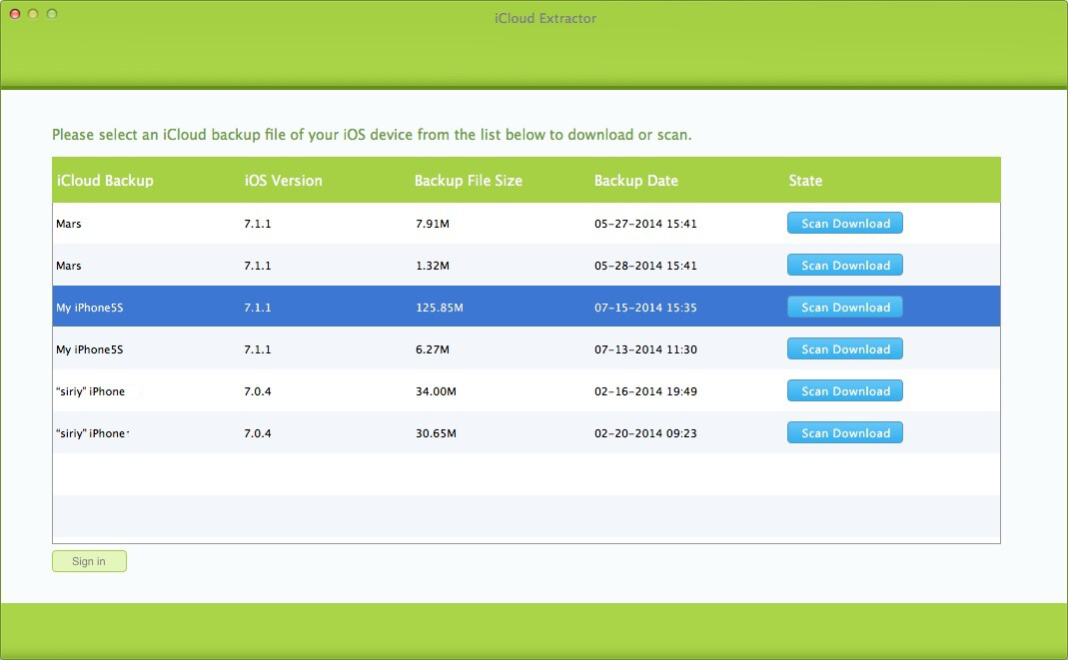
iCloud Extractor provides the solution to extract the iCloud backup including photos, videos, contacts etc. to Mac or external hard drive in a breeze. By freeing up the iCloud storage space, it enables its users to back up the iPhone or iPad to iCloud when there is not enough room. Instead of ponying up more for iCloud storage, iCloud Extractor saves more space and money for you.
Access and Manage Your iCloud Backups Conveniently
After signing in to iCloud with your Apple ID, iCloud Extractor automatically reads and lists all the backups from your iCloud account. You start by choosing a backup point to extract the data from. iCloud Extractor will display your backup data including camera roll, photo stream, app photos and videos, contacts, text messages, notes etc.
By extracting the iCloud backups to your Mac computer or external hard drive, you can make those data freely accessible. And that also keeps your vital data safe and manageable.
Free up Your iCloud Storage Space before Paying for More
Apple provides just paltry 5GB of iCloud storage for free, and that can get tight quickly. When you don’t have enough storage on iCloud, you can’t back up your iPhone, or iPad until you have extra room. After extracting your iCloud backup with iCloud Extractor, you can delete the unnecessary backups to reclaim precious storage space.
When you reach or exceed your iCloud storage limit, you can remove the backup files you don’t need before paying Apple for more. Not just space, iCloud Extractor saves more money for you!
About iCloud Extractor for Mac
This Backup & Restore program is available in English. It was last updated on 29 September, 2026. iCloud Extractor for Mac is compatible with the following operating systems: Mac.
The company that develops iCloud Extractor for Mac is Fireebok Studio. The latest version released by its developer is 1.5.0. This version was rated by 1 users of our site and has an average rating of 5.0.
The download we have available for iCloud Extractor for Mac has a file size of 3.1 MB. Just click the green Download button above to start the downloading process. The program is listed on our website since 2015-05-03 and was downloaded 3,999 times. We have already checked if the download link is safe, however for your own protection we recommend that you scan the downloaded software with your antivirus. Your antivirus may detect the iCloud Extractor for Mac as malware if the download link is broken.
How to install iCloud Extractor for Mac on your Windows device:
- Click on the Download button on our website. This will start the download from the website of the developer.
- Once the iCloud Extractor for Mac is downloaded click on it to start the setup process (assuming you are on a desktop computer).
- When the installation is finished you should be able to see and run the program.
Program Details
System requirements
Download information
Pricing
Version History
version 1.5.0
posted on 2015-05-03
Supports to scan incomplete backup
